Your customers design their lights.
On your website, Design Your Lights shows the homeowner their own house in one of six looks, from C9s to icicles to multicolor. They add trees and wreaths and press Send.
Compare · Light Ops vs Workiz
Customers follow their job on their own page and report outages with photos. Try it free.

Workiz calls itself an AI growth engine for home service businesses. Light Ops is software for Christmas lighting companies, from the first quote to the last repair of the season.
| What you get | Light Ops | Workiz |
|---|---|---|
| Built for Christmas and holiday lightingMade for one kind of business: lighting installers and their season. | Built for home services in over 50 industries | |
| Customers design their own lights on your websiteHomeowners see their own house lit in one of six looks, then press Send. | Not listed on their site | |
| Photo measured into a priced quoteFeet from the house photo become C7s, clips, minis and strands from your price list. | Not listed on their site | |
| Website quote form into the officeRequests from your website land in the office with the project details. | Online booking on every plan | |
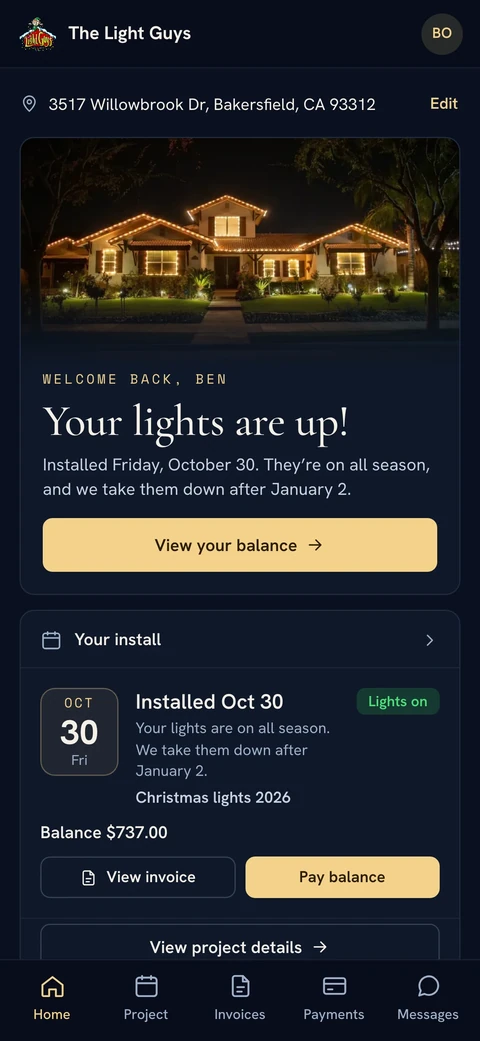
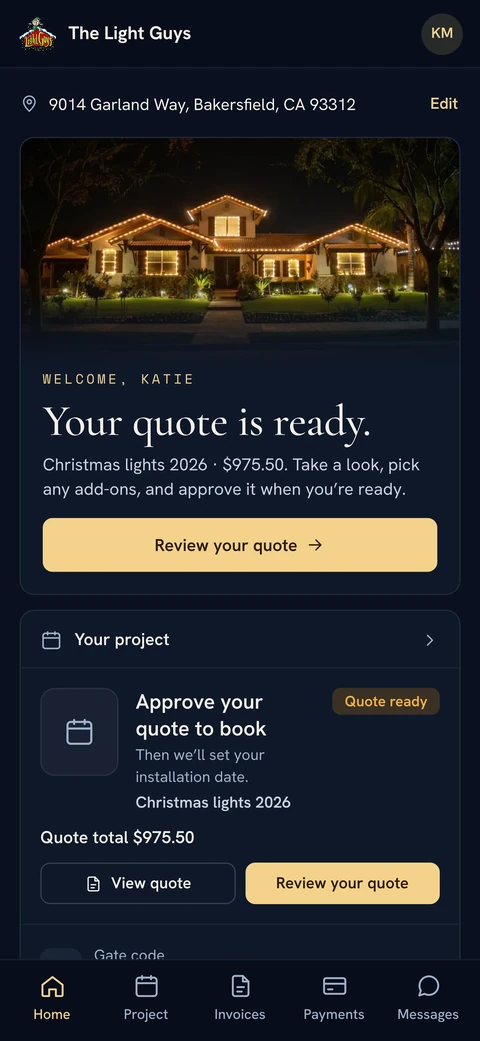
| A customer page that follows the seasonQuote, deposit, install countdown, crew on the way, lights up, take-down notice. | Client portal on every plan | |
| Customers report outages with photos“Something’s out?”: where, what and a photo. The fix stays on the same job. | Not listed on their site | |
| Gate codes sent to the crew on arrivalCodes pop up on the crew’s lock screen when they tap On my way or get close. | Not listed on their site | |
| QuickBooks Online syncCustomers, invoices and payments go into your books automatically, included in every plan. | On Standard and higher plans | |
| Guided setupA setup list walks you through your logo, prices, customers, card payments and team. | Onboarding specialist and data import | |
| Made by lighting installersBuilt and used at The Light Guys, a working Christmas lighting business. | Not listed on their site |
Workiz details come from workiz.com, checked October 12, 2026. Sources: Workiz homepage, Workiz pricing and plan features, Workiz onboarding (Workiz vs Jobber page). QuickBooks details checked October 31, 2026: Workiz pricing. Features change, so check their site for the latest.
Built inside a working Christmas lighting company, around how a season actually runs.
Design Your Lights
On your website, homeowners add a photo, pick one of six looks and see their own house lit in about 15 to 30 seconds. They press Send, and your office gets a new customer and a Job with the design, the photo and the measurements. See Christmas light design software

 Their photoTheir design
Photo to Quote
The house photo is measured, with the garage door as the ruler. When you open the quote, it already has the lines: color-matched C7s with clips, minis for trees, cords, a timer, install and removal, with feet turned into strands from your own price list. You check the numbers and send. See Christmas light quoting software
One Job
Every job lives on one record: customer, quote, invoice, payments, install date, gate code, photos and repairs. You move it along with one stage menu, in two clicks, in any direction. Money updates itself. The stage only moves when you move it. See the Christmas light CRM
Customer Page
Quote, deposit, install countdown, “Your crew is on the way”, “Your lights are up!”, then the take-down notice. After install, customers tap “Something’s out?” to report where and what, with a photo.
Install Day
Gate codes pop up on the crew’s lock screen as they arrive. Stops go in best order by drive time, the truck load list builds itself, ladders are checked back in before a job closes, and it all works with no signal. See Christmas light scheduling software

“I run a Christmas lighting company. Every software I tried was built for plumbers or lawn crews, so I built Light Ops inside The Light Guys. One Job holds everything, from the homeowner designing their lights on our website to the last repair in December.”
Workiz is software for home service businesses. Its site lists scheduling and online booking, dispatching, estimates, invoicing, payments through Workiz Pay, AI phone answering and a client portal, with a mobile app on every plan.
It names HVAC, plumbing, electrical, locksmith, appliance repair and garage door companies, and says it serves home services in over 50 industries. A lighting company sets it up around its own way of working.
 Light OpsEvery feature
From$29.99/ month
Billed annually. $25 a month for each additional user.
Book a 20-minute callOn your website, Design Your Lights shows the homeowner their own house in one of six looks, from C9s to icicles to multicolor. They add trees and wreaths and press Send.
We measure the house photo with the garage door as the ruler. Feet turn into strands from your price list, so the quote starts with the lines a lighting job needs, including install and removal.
Customers tell you where the problem is and what is wrong, with photos. Crews see it on their Repairs tab, and the fix stays on the same Job as the install.
A setup list walks you through your logo, prices, customers, card payments and team. Try it free.
Yes. Light Ops is built for Christmas and holiday lighting companies, from the first quote to the last repair of the season.
Yes. Start a free trial and follow the setup list, or book a 20-minute call if you want help.
Yes. Design Your Lights runs on your website and sends each design straight into Ops.
Every plan includes every feature. Hosting, storage and email are included, with no automatic overage charges. All the prices are on the Pricing page.
To move from Workiz, start a free trial, or book a 20-minute call and we’ll look at how you handle quotes, deposits and installs during the season.