 Light Ops
Connected
QuickBooks Online.
Invoices and payments go into your books automatically. See how it works.
Product · Quoting
Build an itemized quote from your own price list. Your customer picks add-ons, approves it and pays the deposit on their own page.
Screens on this page show made-up sample customers.
Build professional quotes in minutes. Customers can customize, approve, and pay right from their phone. Every invoice and payment stays connected to the job.
Build it
Add lines from your price list: C7s by the strand, clips by the foot, minis, wreaths, extension cords, a timer, and your install and removal. Change any quantity or price on the line. Add a discount if you like. Totals, tax and the deposit work themselves out.
Quotes from your website’s quote form start with the lines already in, so you check them and send.

Add-ons
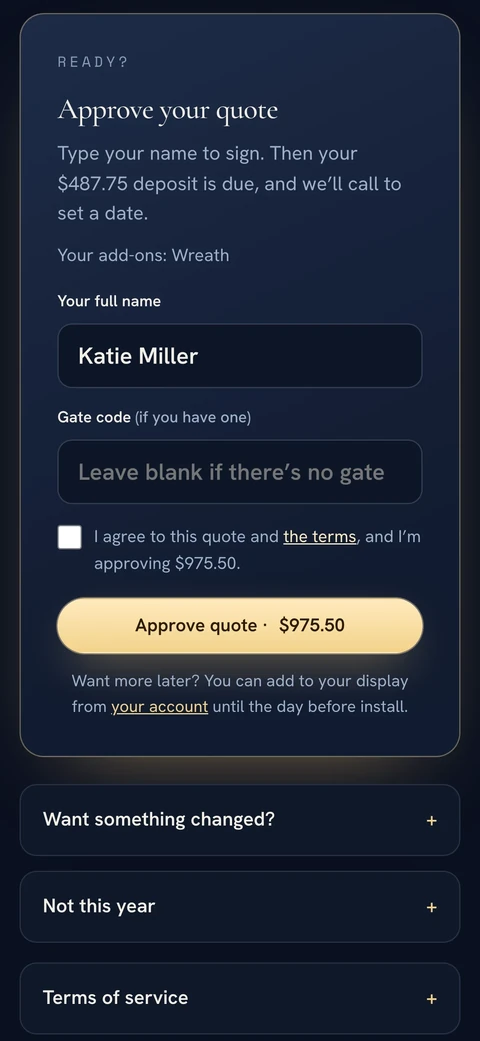
Mark lines as optional add-ons: a wreath for the front door, minis for the front trees. The customer ticks what they want and sets how many, and their total and deposit update as they go.

Approve and pay
The customer opens the quote on their own page, types their name to approve it, and pays the deposit by card. The money goes straight to your Stripe account. If they want something changed, or it’s not this year, they tell you right there.
Invoice and get paid
An approved quote becomes the invoice. Card payments made on the customer page are recorded for you, and cash or checks take one click. Paid or Unpaid comes from real payments, so you never update it by hand.

Where the money goes
Light Ops doesn’t hold your customers’ money. Stripe’s card fees are separate from your Light Ops plan.
Katie’s sample quote.
Two things before you send.
Connected
Invoices and payments go into your books automatically. See how it works.
Good to know
Quotes that start filled in, from a design or the quote form, are a starting point. Your office checks the feet, materials, labor and prices before sending.
Want a quick number first? Try the free Christmas light quote calculator.
Yes. Your price list is yours: bulbs, clips, minis, wreaths, cords, timers and labor at the prices you charge. You can change any price on a single quote too.
They open it on their own page, pick any add-ons, type their name to approve, and pay the deposit by card.
Straight to your own Stripe account. Light Ops doesn’t hold your customers’ money. Stripe’s card fees are separate from your Light Ops plan.
Yes. Light Ops runs in the browser on a computer, tablet or phone.
For requests from Design Your Lights, yes. The house photo is measured, with the garage door as the ruler, and the quote starts with the lines filled in from your price list. You check the numbers and send. For other quotes you enter the feet, and Light Ops turns them into strands and clips.
Built by an installer, for installers
Start a free trial with your own prices, customers and crew. Card required. No charge until your trial ends. Cancel anytime.